

Version Number:
4.40
Made for tablets and foldables
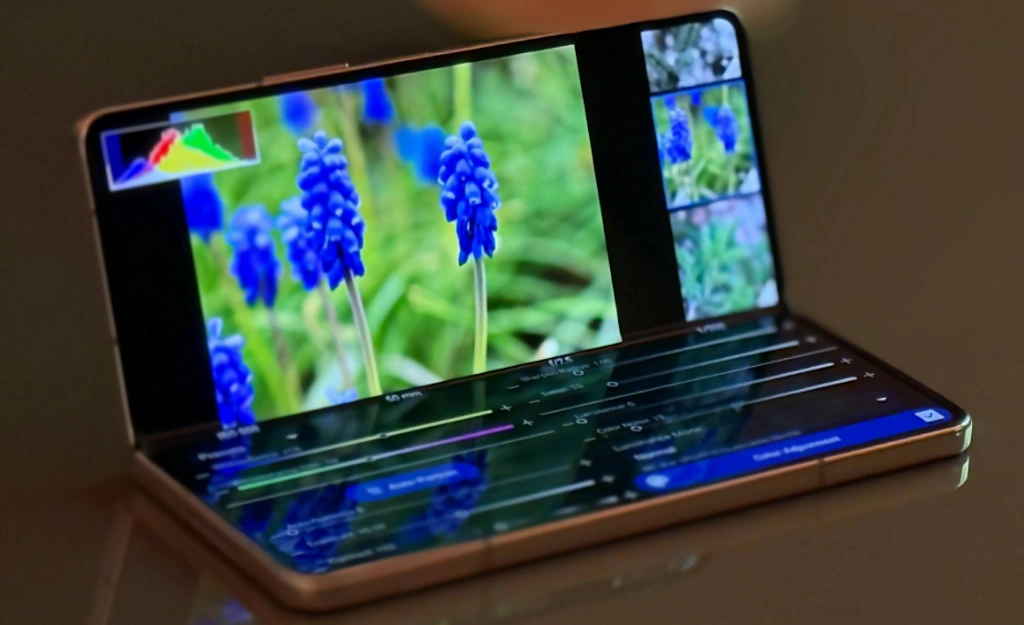
- Gallery with a preview column. Tap a picture and see it right next to the grid, with histogram and EXIF data. Drag the divider to the width you like. Double tap a thumbnail to open it straight away.
- A proper editor column in Develop. Resize it freely, split it into two columns on wide screens, and jump to any editor group from the new rail. The editor runs full screen, with undo, redo, presets, crop, share and save in one bar.
- The 100% loupe. Check sharpness while you edit. Pin the loupe over the picture and double tap it to switch between 100% and 200%.
- Tabletop mode for foldables. Half-open your foldable and Develop splits at the hinge: the picture on the upper half, the editor on the lower.
- Layouts that follow your window. Fold, unfold or enter split-screen and Photo Mate re-arranges itself.
Network shares, rebuilt from scratch
Photo Mate's SMB support now runs on a modern engine with SMB 2 and 3. That means Windows 11, current NAS devices and macOS work again.
.